
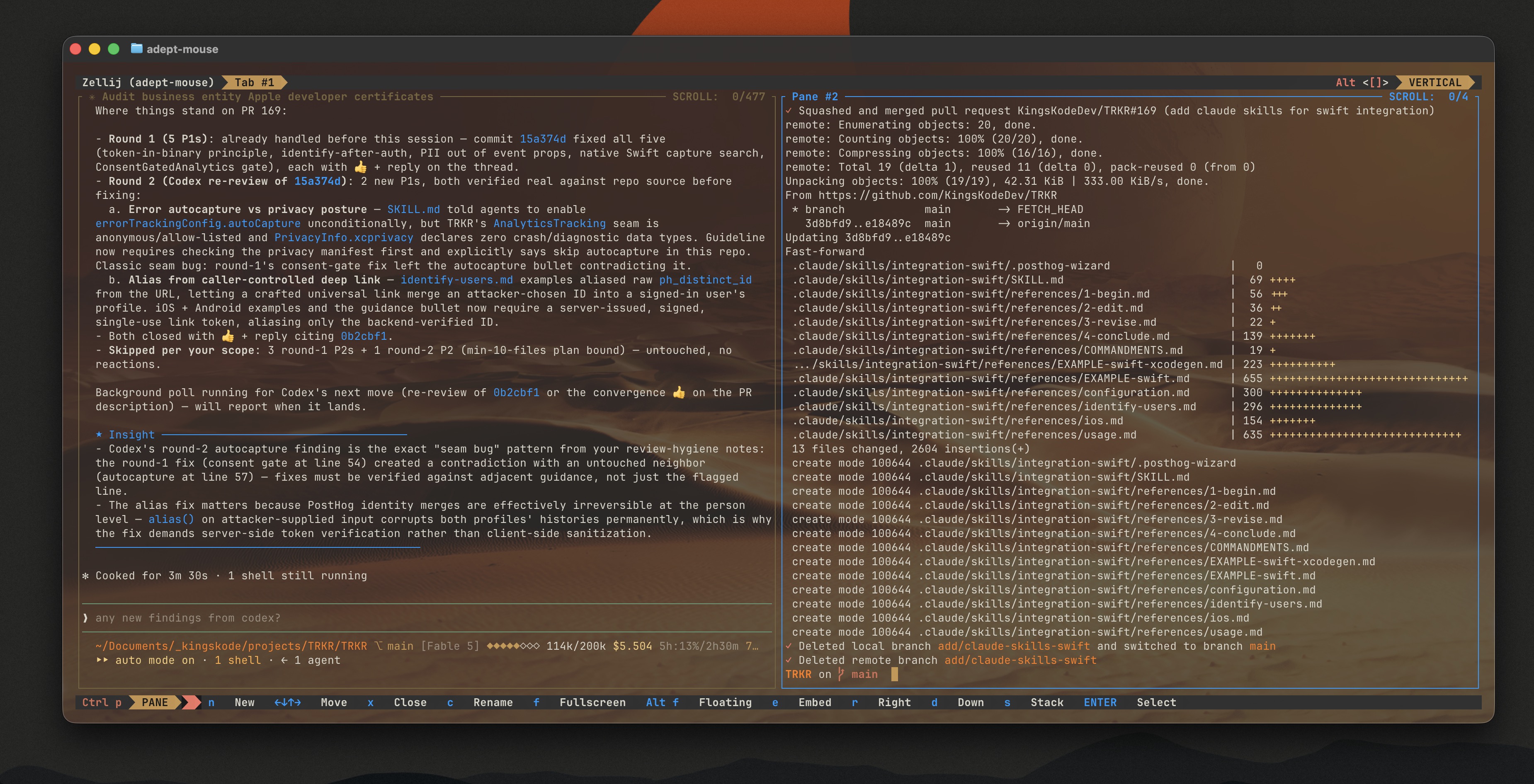
I didn't set out to rice my terminal, I mean we always knew that was going to happen... Warp just pay-walled the only reason I was using it— like the Bene Gesserit making me put my hand in the box forcing me to pull out my credit card.
This is the story of why I left Warp, why Ghostty won, why Zellij got bolted on top, and how the whole stack ended up wearing the same spice-and-sand palette.
Why I was on Warp in the first place
I was an early adopter of Warp for 1 reason: the integrated agent. Having an AI right there in the terminal for one-off questions — "what's the flag for this?", "write me the git command to undo that" — was genuinely useful. I didn't have to context-switch to a browser, interrupt my Claude flow, paste in a command, and copy the answer back. For quick bash/git help, it earned its place. I also loved that the prompt had clickable links to PRs and a side-pane markdown viewer.
I was a Warp-evangelist; told everyone I knew to 'just give it a try'. Warp was the terminal I used because of the agent.

Why I left
Then the deal changed. Warp pulled the free agent interface plug, and made it BYOAgent, requiring API usage — with no support for a Claude Max subscription. To be clear, they support a Grok subscription, but not for Claude or Codex.
I already pay for Claude Max. The whole point of paying $200/mo is that I don't want to 'pay at the pump' too. Warp's new model meant paying Anthropic for API tokens on top of the subscription I already had, just to keep using a feature inside someone else's terminal.
Warp had lost its usefulness, but I still really liked having a superfast agent, within my environment, for quick 1-offs. I said, "you're gonna make me BYOA? I'll just BYOTerm." And so the hunt began.
Why Ghostty
I'm not going to BS you here, I'm a bandwagoner for many things (hot tech is certainly one) and everyone was talking about Ghostty on Reddit and Medium so I thought I'd give it a try. I went to Ghostty.org, and sure 'nuff, 'Ghostty is fast...[and] GPU-accelerated'; SOLD. It's Mitchell Hashimoto's, opens in a new tab terminal (I still don't know what he's famous for, but he's got that industry recognition) — native on macOS, GPU-accelerated, and configured entirely through a plain text file. There's no login, no telemetry dashboard, no onboarding flow. You edit a config file, you reload, that's it.
First thing I did was get my starship prompt up and running, and started feeling a little cute—like back when I was running iTerm2. Next thing I did was get my quick-agent installed onto my M5 Max machine, using the Qwen3 model — more on that in a minute.

My base config is about a dozen lines:
1shell-integration = zsh2copy-on-select = clipboard34notify-on-command-finish = always5config-file = ?auto/spice_theme.ghostty6font-family = 'MonaspiceKr Nerd Font'78background-opacity = 0.979window-padding-x = 1610window-padding-y = 161112# Cmd+Shift+V sends Ctrl+V (0x16) to the app for Claude Code image paste.13# Cmd+V stays as Ghostty's native text paste.14keybind = cmd+shift+v=text:\x16
See what I did there with the font—IYKYK. That last keybind is worth copying if you use Claude Code. Pasting an image into Claude Code needs Ctrl+V, but Mac muscle memory is Cmd+V. Cmd+Shift+V sends the Ctrl+V byte through to the app, and regular Cmd+V stays normal text paste. Screenshots drop straight into Claude Code and I never think about it.
The theming: making it Arrakis
After 2 weeks of using vanilla Ghostty and my cutesy little starship prompt, I desired more. I saw a trailer for Dune 3 and was inspired. I combed through all the Ghostty themes and could not find a single one that landed.
I found the config files for the themes and they were super simple; so I set out to build it myself. Sand, spice, crysknife, and a rare flash of Fremen blue. Not a novelty theme — something I could stare at for ten hours a day without regret.
The palette
Everything hangs off one ANSI palette in a Ghostty theme file (spice_theme.ghostty):
1# Dune / Arrakis ANSI palette2palette = 0= #1a1a1a # graphite black3palette = 1= #f17465 # errors / spice red4palette = 2= #f5cf7b # strings / sand gold5palette = 3= #c7964f # types and constants / spice ochre6palette = 4= #88bbcb # integers / muted stillsuit blue7palette = 5= #d46f57 # control flow / burnt spice8palette = 6= #ff7a18 # functions / electric Arrakis sunset9palette = 7= #d9d7ca # Crysknife ivory — milky sandworm-tooth white; primary terminal text1011background = #30303012foreground = #d9d7ca13cursor-color = #c7964f14selection-background = #77643e
The bright variants follow the same logic, with one exception:
1# Eyes of Ibad electric blue — intentionally rare2palette = 12=#009cff
The blue is what has made my rice worth every second configging.
And under it all, the actual desert:
1background-image = dune-desert.jpg2background-image-opacity = 0.263background-image-fit = cover45# Apply Ghostty's opacity to explicitly colored application cells,6# including Zellij bars and panes.7background-opacity-cells = true
Why Zellij got bolted on
Zellij got bolted on for 1 reason, I wanted to rice my terminal and put a background image in there. Ghostty would repaint the image per pane, and that was no good. Zellij popped up on the radar as a workaround but it comes with so much more that it's worth it beyond the rice:
- Session persistence. I run long Claude Code sessions. If the window dies I want the session to survive. Zellij detaches and reattaches. Ghostty alone can't.
- Real layouts. Several projects and several Claude Code sessions going at once. Zellij gives me stacked panes, floating panes, named tabs. An actual workday fits in it.
- hjkl everywhere. Pane focus moves with vim keys. I'm a casual nvim user at best, but the keyboard nav is getting more familiar every week, and Zellij using the same hjkl as my editor means every pane switch is also practice.
- The rice reason. I wanted a background image behind the whole window, not tiled per pane. Ghostty draws one image, Zellij does all the splitting inside that single surface, and the desert stretches unbroken behind every pane. Ghostty's native splits couldn't do that.
So the split of labor: Ghostty draws the window, the font, and the desert. Zellij owns everything inside it. Claude Code runs in the panes.
Zellij wears the same colors
Zellij has its own theme system (KDL, RGB triples instead of hex), so I mirrored the palette into a custom theme:
Note: Zellij legacy themes support hex but docs recommend using RGB.
1// Complements the Ghostty spice theme.2themes {3 spice {4 text_unselected {5 base 242 229 204 // parchment6 background 48 48 48 // graphite7 emphasis_0 241 116 101 // spice red8 emphasis_1 199 150 79 // ochre9 emphasis_2 0 156 255 // Eyes of Ibad10 emphasis_3 212 111 87 // burnt spice11 }12 frame_selected {13 base 199 150 79 // active pane border: ochre14 ...15 }16 frame_highlight {17 base 0 156 255 // the rare blue, again18 ...19 }20 }21}2223theme "spice"
Two details that complement my Ghostty theme perfectly:
- The active pane frame is spice ochre, and the frame highlight is the Eyes of Ibad blue. I hover over inactive panes just to see it.
exit_code_successrenders in sunset orange (#ff7a18) instead of the usual green. Green on Arrakis is too precious to spend on exit codes: me, committing to the bit.
Theming Claude Code
Half of Claude Code's theming came free. Its base colors come from the terminal's ANSI palette, and the palette is all spice now — that's the payoff of theming at the ANSI layer instead of per-app. git diff, test runners, whatever speaks ANSI is on Arrakis automatically.
But Claude gets its own custom theme on top because I kept getting a Claude magenta that the Lisan al-Gaib wound’t approve of. Claude Code supports custom themes as JSON, so I built claude-spice on the dark-ansi base with overrides for the semantic colors:
1{2 "name": "claude-spice",3 "base": "dark-ansi",4 "overrides": {5 "claude": "#5f9b74", # House Atreides banner green; Claude's primary brand accent, spinner, and assistant identity.6 "planMode": "#c7964f", # Spice ochre for plan-mode borders and indicators.7 "fastMode": "#ff7a18", # Electric Arrakis sunset orange for fast-mode emphasis.8 "autoAccept": "#ff7a18", # Electric sunset orange for auto-accept mode.9 "warning": "#f5cf7b", # Sand gold for warnings and caution states.10 "error": "#f17465", # Spice red for failures and destructive states; shared with Ghostty palette 1.11 "success": "#ff7a18", # Electric sunset orange for successful actions and passing checks.12 "ide": "#88bbcb", # Muted stillsuit blue for the IDE connection indicator.13 "purple_FOR_SUBAGENTS_ONLY": "#d46f57" # Remaps Claude's purple subagent slot to burnt spice, keeping purple out of the theme.14 }1516}
Most of it maps straight onto the palette: plan mode in ochre, fast mode and success in sunset orange, warnings in sand gold, errors in spice red, subagents in burnt spice, IDE hooks in stillsuit blue.
Then the one deliberate break from the sand: Claude's own accent — the prompt border, the permission prompts, the shimmer — is green. #5f9b74, sietch green. The Fremen aren't without green; they grow their plants hidden away in sietch greenhouses, saving the color for what matters. In a terminal that's all sand and spice, the living green thing is the agent.
The part of Warp I actually kept — now local
There was still a hole. Claude Code is what I reach for when there's real work to do, but the thing that got me on Warp was smaller than that: 1-off questions. How do I squash the last 3 commits. Rename all .jpeg to .jpg recursively. Spinning up a full agent session for a one-liner is overkill.
So that job went local. I run Qwen3-Coder-30B (the A3B instruct model, 8-bit MLX build) on Apple Silicon, served by mlx_lm on 127.0.0.1:8080. Nothing leaves the machine. Two tiny commands sit in front of it:
1q how do I squash the last 3 commits2git log --oneline -5 | q what changed here34qc # back-and-forth chat when one answer isn't enough
q is one-shot. qc keeps context for the session, with /reset, /history, and arrow-key history that persists across runs. Both boot the server themselves if it isn't running, so after a reboot the first question prints a warming message and everything else is hands-off.
I have not attempted to optimize my local agent but here's my stats: about 0.8s to answer warm, about 4s cold, roughly 18GB resident once loaded. The server keeps a KV cache for the conversation prefix (--prompt-cache-size 4), so multi-turn chat only prefills the new message instead of re-reading the whole history. Fast enough that reaching for a browser never crosses my mind. This is sufficient spice production that all the houses can support.
The system prompt is three lines and does more work than you'd expect: it tells the model it's on macOS with Apple Silicon, zsh, and BSD userland — not GNU. That last clause alone kills the entire category of "here's a sed -i flag that doesn't exist on your machine" answers.
Where it landed
The stack now:
- Ghostty — the window, the font (MonaspiceKr Nerd Font), the palette, the desert
- Zellij — sessions, tabs, panes, layouts, in matching spice
- Claude Code — the real agent, on the subscription I already pay for, inheriting most of my Ghostty theme for free
- Qwen3-Coder, local — the 1-off command habit Warp taught me, now free, private, and faster than Warp ever was
The integrated-AI terminal made sense right up until the agents became portable. Claude Code goes anywhere. A 30B coder model runs on my laptop. Once that happened, the terminal's job shrank back to being a great terminal; fast, efficient, just the like Muad’Dib.

Also, my terminal looks like Arrakis now. The spice must flow.